 Network Intelligence
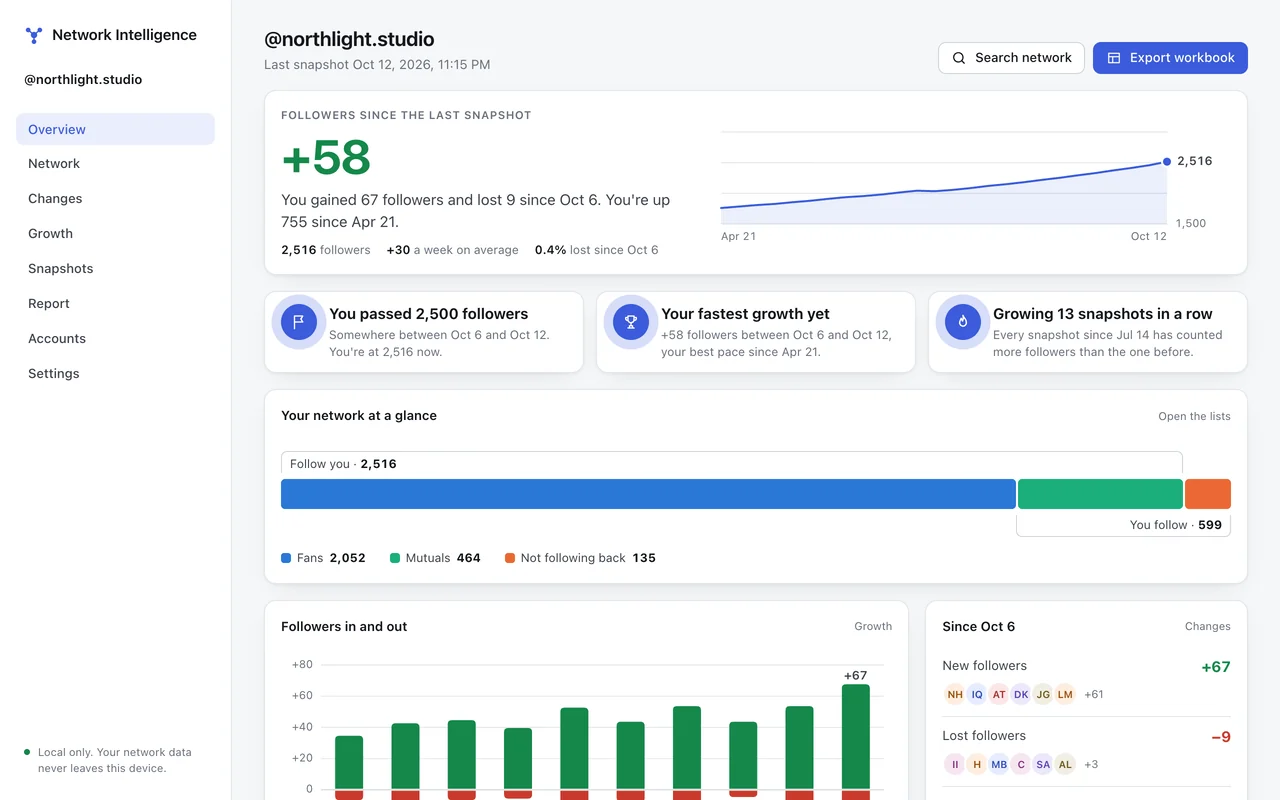
Stop scrolling through lists. Start seeing what changed.
Take a snapshot whenever you like. Each one is compared with the last, so you see exactly who came, who went and how you're growing.
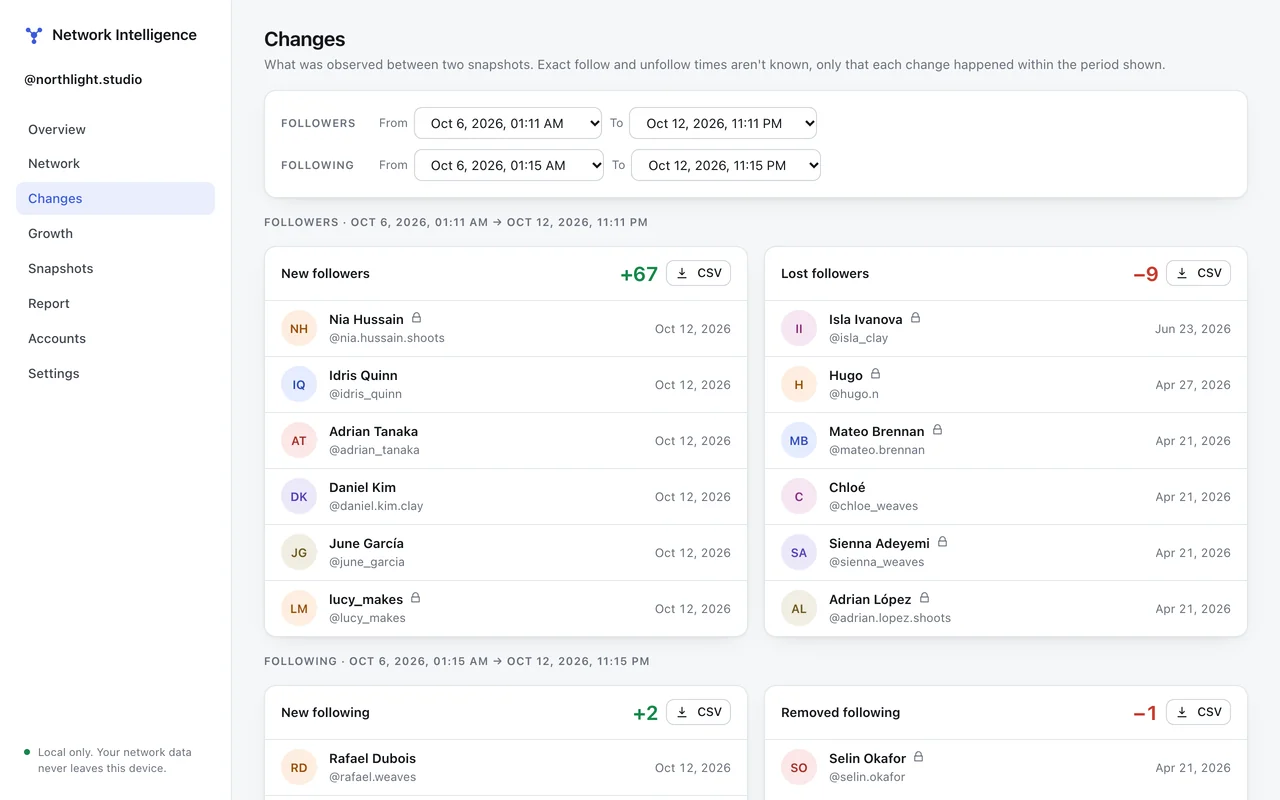
Who came, who left. By name.
No more guessing who unfollowed you. Pick any two snapshots and get both lists, side by side.
- New followers and unfollowers between any two snapshots, by name.
- Quick check shows who's new in seconds, between full snapshots.
- Username changes are recognised, so a rename never looks like an unfollow.
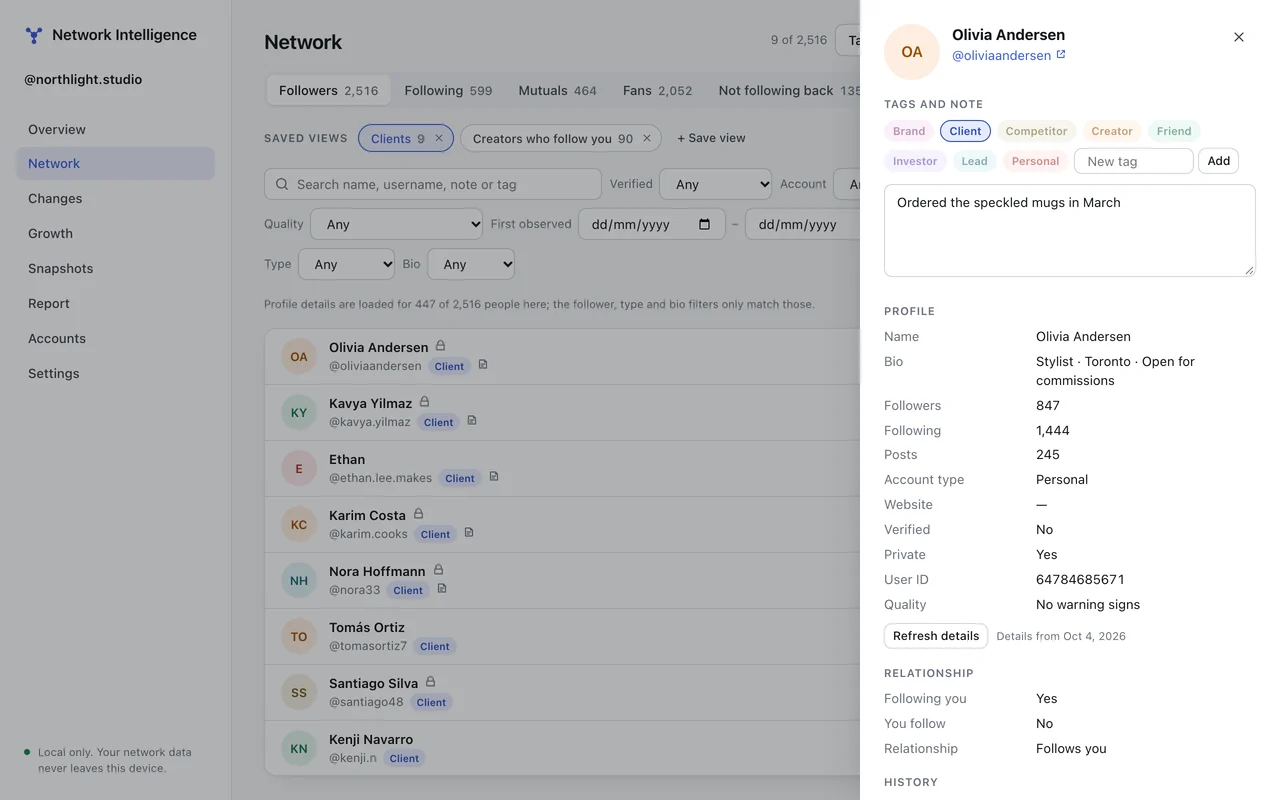
Your whole network, sorted.
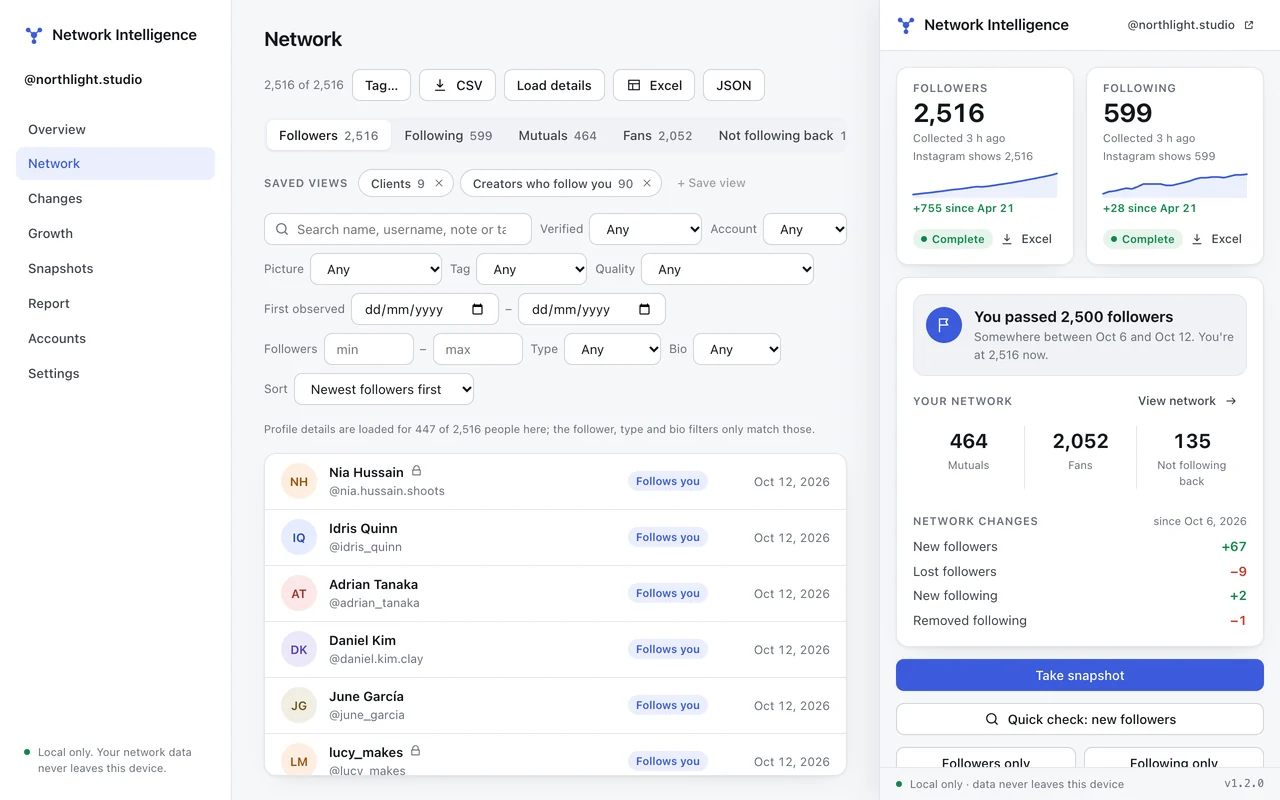
Everyone who follows you and everyone you follow, in one searchable place.
- Not following back, mutuals and fans, each as its own list.
- Chronological order: newest followers first, or oldest first.
- Search, tags, notes and saved views to keep track of the people who matter.
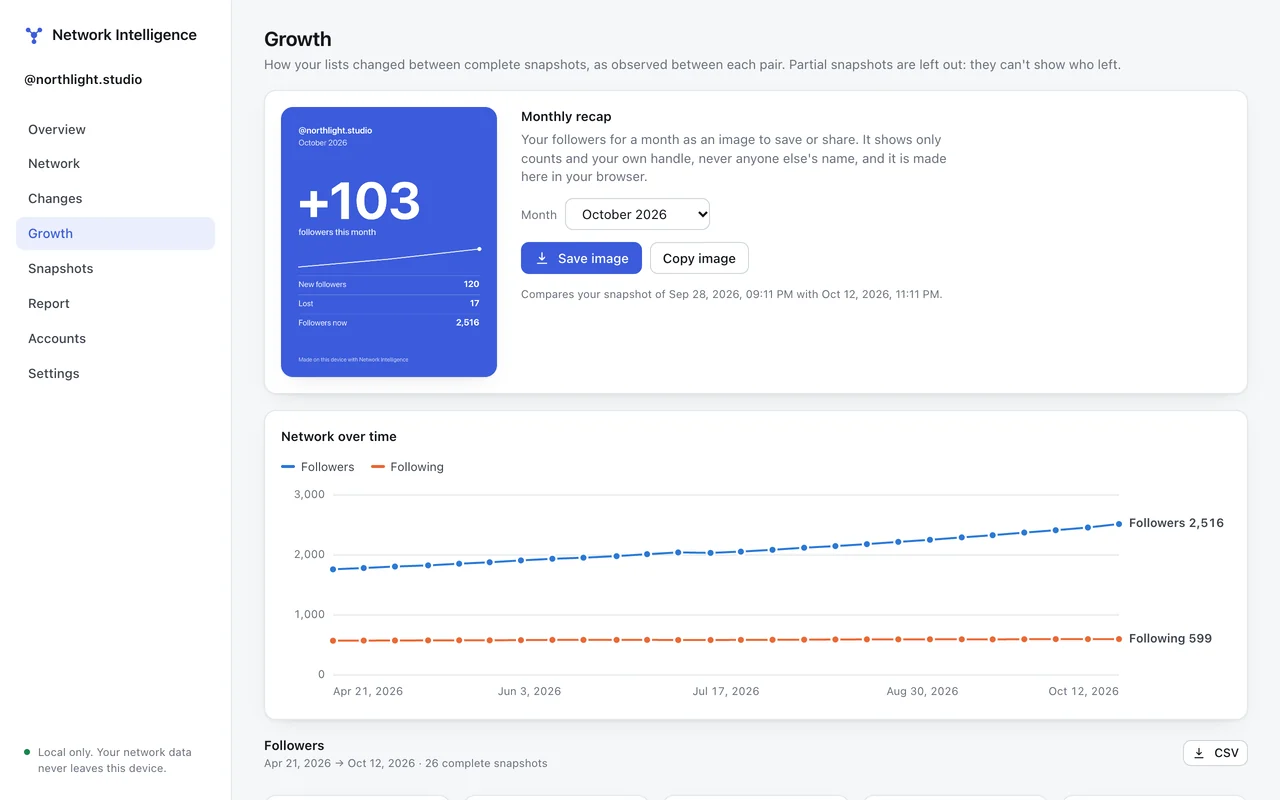
Growth that keeps you going.
Every visit opens on what's going well, worked out from your own snapshots.
- Milestones, best weeks and growth streaks, celebrated as they happen.
- Net change, weekly average and churn, week by week.
- A monthly recap image, ready to save or share.
Three steps. No sign-up.
It works through the Instagram tab you already have open in Chrome, so there's nothing to log into and no password to hand over.
Add it to Chrome
Then open Instagram on your computer, logged in as usual.
Take a snapshot
One click in the side panel. It reads your lists at a human pace and picks up where it stopped if the tab closes.
See what changed
Come back any time for another snapshot, or a quick check in seconds. Every snapshot adds to your history.
Your followers never leave your computer.
Many follower apps ask for your Instagram password or copy your lists to their servers. This one can't. There is nowhere for your data to go.
The extension and everything it collects: snapshots, history, tags and notes.
Your own logged-in tab, the same way it loads your lists when you open them.
No password
It never asks for, reads or stores your Instagram password.
No server, no account
No sign-up, no analytics, no third-party code. Nothing is ever uploaded.
Read-only
It never follows, unfollows, likes, comments on or messages anyone.
You're in control
Back up to a file you keep. Delete everything in one click, any time.
Don't just take our word for it
Every permission it asks Chrome for, in plain words:
- instagram.comRead your own followers and following, in your tab
- StorageKeep your snapshots on your device
- Side panelShow the controls beside Instagram
- Alarms, notificationsOptional reminders, and continuing a paused collection
- ScriptingReconnect to Instagram tabs already open, without a reload
Built to be checked
The extension's code ships readable, not minified, so Chrome's reviewers and anyone curious can see exactly what it does. It talks to no site but Instagram.
This website has no cookies and no trackers either. Read the full privacy policy.
Built for creators, brands and the people who run them.
Quick check
See your newest followers in seconds, without waiting for a full snapshot.
Chronological order
Your followers newest first or oldest first. Exact follow dates come in from Instagram's own data download.
Quality signs
Spot accounts that look inactive or fake, with the reasons shown. Worked out on your device.
Export to Excel and CSV
One workbook with every list and change, CSV or JSON for any view, and a printable report.
Tags, notes, saved views
Label collaborators, clients or friends, tag in bulk, and keep the filters you use most.
Several accounts
Workspaces for agencies and social media managers looking after more than one account.
Reminders and auto snapshots
A nudge when it's time, or snapshots that run by themselves while Instagram is open.
Pause and resume
Stop any time. If Chrome restarts, the collection carries on by itself once Instagram is open again.
Honest numbers
Every run reports expected, collected and coverage. A partial list is always labelled partial.
See it in action.
Shown with a made-up demo account. Your own numbers stay on your computer.
Good questions, straight answers.
How do I see who unfollowed me on Instagram?
Add the extension, open Instagram in Chrome and take a snapshot. Take another one later, a day or a week on. The Changes page then lists everyone who followed you and everyone who left in between, by name.
How can I see who doesn’t follow me back?
After a snapshot, open Network and choose Not following back: everyone you follow who doesn’t follow you, searchable and ready to export. Mutuals and fans have their own lists too.
Does it need my Instagram password?
No. It never asks for, reads or stores your password. It works through the Instagram tab you’re already logged into in Chrome, the same way Instagram loads your lists when you open them.
Where is my data stored? Is anything uploaded?
Everything stays in your browser, on your own computer. There is no server and no account, so nothing is uploaded and nobody, including the developer, can see your followers.
You can back it all up to a file you keep, or delete everything from Settings at any time.
Is it safe to use with my account?
It only reads your own lists, through your normal logged-in tab, at a human pace of about 12 accounts every 2 to 4 seconds. It never follows, likes, comments on or messages anyone, and loads profile details only for people you pick, at most 200 per run and 500 a day.
No tool that reads Instagram can promise how Instagram will treat it, which is exactly why this one goes slowly on purpose.
Can I check who unfollowed me without an app?
Yes. It’s a browser extension, so there’s no app to download on your phone and no website to give your login to. It runs on your computer, in the Instagram tab you already have open.
Can I track my Instagram follower count and growth over time, with dates?
Yes. Every snapshot is kept, so you can compare any two of them, see your net change, weekly average and churn, and follow 26 weeks of growth. Each change carries the date of the snapshot that found it.
Does it work with a private account?
Yes. It reads your own followers and following through your own logged-in tab, so it works the same whether your account is public or private.
How do I spot fake or inactive followers?
The extension flags accounts that look inactive or fake, such as no picture, no posts or an unusual follow ratio, and shows the reasons. It’s an estimate made on your device, so you decide what to do with it.
Will it unfollow people for me?
No. It’s read-only: it never follows, unfollows, likes, comments on or messages anyone. It shows you who doesn’t follow you back, and you decide what to do on Instagram yourself.
Can I see my followers in chronological order?
Yes. Followers, mutuals and fans can be shown newest first or oldest first, in the order Instagram itself keeps them. Import Instagram’s own data download and you also get the exact date each person followed you.
Can I export my Instagram followers to Excel or CSV?
Yes. One Excel workbook holds every list and every change, and any view can be saved as CSV or JSON. There’s a printable report too.
Does it work in Edge, Brave or Safari?
It works in Google Chrome and Microsoft Edge on a computer, and those are the browsers it’s tested on. Brave and other Chromium-based browsers can install it from the Chrome Web Store too. In Edge, choose “Allow extensions from other stores” when it asks.
Safari and Firefox can’t run Chrome extensions, so they aren’t supported.
Does it work on my phone?
It’s a browser extension for computers: Windows, Mac, Linux or ChromeOS. Phones and tablets can’t run extensions like this one.
Is it free?
Yes, it’s free to install.
What happens to my data if I remove the extension?
Chrome deletes it together with the extension. If you might come back, save a backup first with Settings → Back up now; restoring that file brings everything back.
Is it made by Instagram or Meta?
No. It’s an independent tool, not affiliated with, endorsed or sponsored by Instagram or Meta.
Your followers. Your device. Your story.
Take your first snapshot today and see what changes by next week.
Compatible with Chromium browsers: Chrome, Edge, Brave
- No password
- No server
- Only on your device
- Read-only